Real life happens—whether a passenger causes damage, a driver earns a performance bonus, or a fare requires an unexpected correction. The Booking Adjustments tool ensures the final numbers remain accurate, transparent, and fair for both your clients and your drivers.
Use this section to seamlessly manage fare breakdowns, customer refunds, or driver payout corrections.
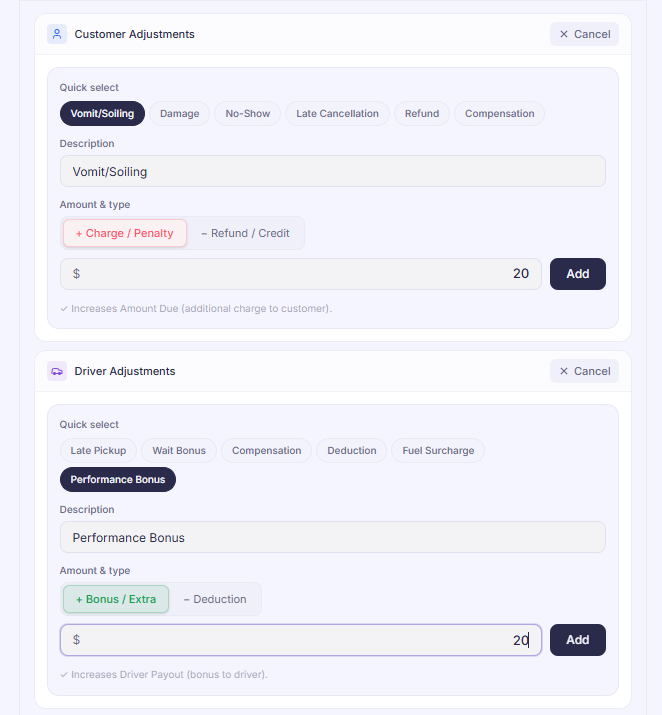
Customer Adjustment (What the client pays)
This section modifies the final invoice total or credit card charge for the passenger or corporate booker.
- Locate the Panel: Open the booking form and scroll down to the Customer Adjustment section.
- Use Quick Select: Click the Quick Select dropdown to instantly apply standardized fees or credits (e.g., Vomit/Soiling, Vehicle Damage, No-Show, Late Cancellation, Refund, or Compensation). This automatically recalculates the customer's total bill using your platform's pre-configured pricing.
- Log a Custom Description: If your specific reason isn’t listed in the dropdown, manually type a detailed entry into the Description field so the billing team and client see a clear explanation on their final invoice.
Driver Adjustment (What the driver earns)
This section manages the driver’s net payout entirely independent of what the customer was charged.
- Locate the Panel: Navigate to the Driver Adjustment section directly below the customer panel.
- Use Quick Select: Choose a preset from the Quick Select options to instantly add standard operational adjustments (e.g., Late Pickup Penalty, Wait Time Bonus, or Company Compensation) without calculating the math manually.
- Log a Custom Description: If the adjustment requires a unique override, type the reason directly into the Description field to ensure flawless, transparent driver payroll records.
Dispatcher Tip
- Financial adjustments can be made while a trip sit in the Finished tab.
- All adjustments will also appear in the payment log for transparency and tracking
Was this article helpful?
That’s Great!
Thank you for your feedback
Sorry! We couldn't be helpful
Thank you for your feedback
Feedback sent
We appreciate your effort and will try to fix the article